 SentnelOps
Gateway guides
Four operator tasks: route a real server through the gateway, read the live feed, hunt ghost agents, and export call evidence.
Route a real MCP server through the gateway
Two moves: tell SentnelOps where the upstream lives, then point your client at the proxy path. First, register the upstream (needs the security or admin role — or do it from the dashboard's Servers page):
curl -s -X POST https://api.sentnelops.com/mcp-servers \
  -H "Authorization: Bearer $SNOPS_API_KEY" \
  -H "Content-Type: application/json" \
  -d '{"name": "github", "upstream_url": "YOUR_UPSTREAM_URL"}'
YOUR_UPSTREAM_URL is the url currently in your MCP client's configuration. The response includes the new proxy_path; re-posting the same name updates the upstream in place. Then point the client at the proxy — for Claude Code, one command:
claude mcp add --transport http github-governed \
  https://api.sentnelops.com/proxy/github/mcp \
  --header "Authorization: Bearer YOUR_AGENT_TOKEN"
YOUR_AGENT_TOKEN is the agent token from registration (layer 1). Cursor, Claude Desktop, and any header-capable MCP client work the same way — snippets for each are in Connect your AI tools. Make a tool call and it appears in the live feed within a second.
Read the live call feed like an operator
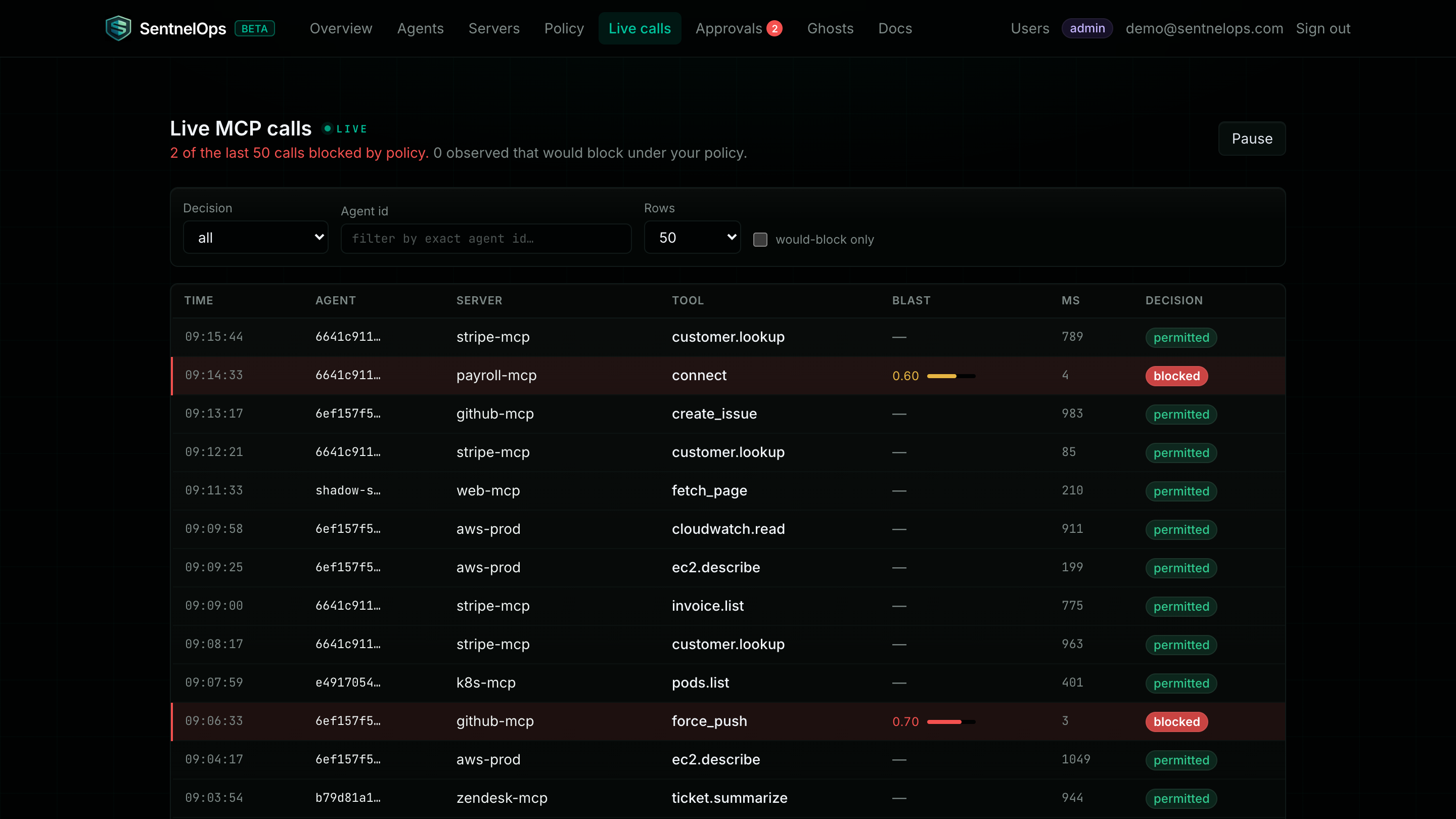
| Column | How to read it |
|---|---|
| Agent / Server / Tool | Who called what. Non-tool traffic still shows up — the JSON-RPC method or request path stands in for the tool name. |
| Duration | Upstream time in milliseconds. A sudden jump is the upstream slowing down, not the gateway — its overhead is ~2 ms. |
| Status | Green permitted passed policy. error means the upstream was unreachable or returned a 5xx. blocked only appears once layer 4 enforcement is on. |
| Would block (red) | The rows to study: the call went through (observe never blocks), but your policy would have denied it — the reason column names the rule. A clean stretch of green here is your green light for enforcement. |
| Blast radius / Reason | The policy engine's risk score for this server+tool, and the violation reason on denied verdicts. |
GET /mcp-calls is the durable record.Hunt ghost agents
Ghosts are callers hitting your MCP servers without being registered — by definition they bypass the gateway, so you find them from the outside in. Collect observed caller identities from your MCP servers' own logs (client names, token subjects, agent ids), then open the dashboard's Ghosts page and paste them, one per line. The diff against the registry is computed as you type.
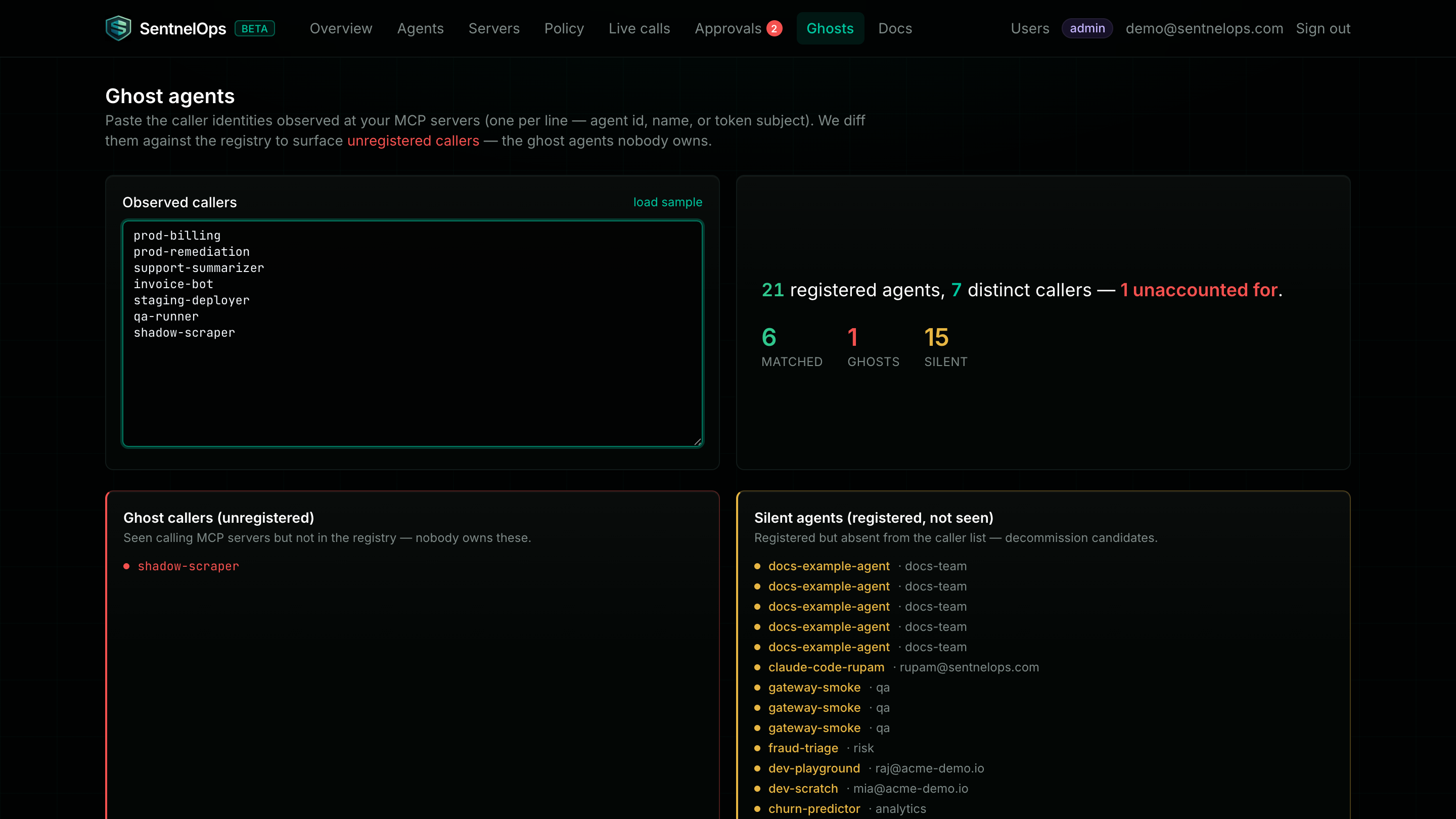
When you find a ghost: first identify the owner — a ghost is usually a teammate's unregistered experiment, not an attacker. If it's legitimate, register it and route it through the proxy so it stops being invisible. If nobody claims it, revoke its credentials at the upstream — the gateway cannot cut off traffic that never passes through it. And treat the amber silent list as the mirror-image finding: registered agents generating no traffic are decommission candidates.
Export call evidence
The durable call log is queryable with filters — by agent, by verdict, by status — and pageable with limit (max 1000) and offset:
curl -s "https://api.sentnelops.com/mcp-calls?agent_id=YOUR_AGENT_ID&would_block=true" \
  -H "Authorization: Bearer $SNOPS_API_KEY"
For auditors and SIEM ingestion, one request produces a CSV of every call in the window (default 30 days, tune with days):
curl -s "https://api.sentnelops.com/mcp-calls/export.csv?days=90" \
  -H "Authorization: Bearer $SNOPS_API_KEY" -o mcp_calls.csv
Both endpoints need only the viewer role. The CSV carries the same fields as the API minus raw params — see the reference for the full row schema.